
LXQt 2.3: The Lightweight Desktop Finally Gets Wayland Right
If you’ve been waiting for lightweight Wayland support that actually works, LXQt is here
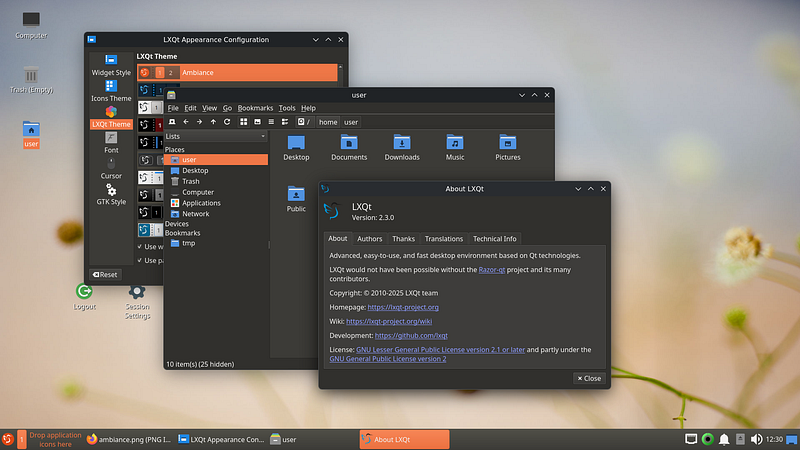
Stop chasing resource-hungry desktops. After 20+ years watching Linux evolve, I can tell you the most important trend right now is not AI integration or fancy animations. It is getting Wayland support stable on lightweight desktops.
LXQt 2.3, released November 5, 2025, might not make headlines like GNOME 47 or KDE Plasma 6. But for those of us who refuse to throw 8GB of RAM at a desktop environment, this release matters more than any flagship update this year.
Why Lightweight Still Matters in 2025
Everyone’s obsessed with the latest desktop bling. Animated transitions, AI assistants, blur effects everywhere.
Here’s what nobody talks about: millions of developers still run older hardware. Students use hand-me-down laptops. Enterprises deploy thin clients. And honestly, some of us just prefer our resources going to actual work, not to a compositor eating 2GB of RAM.
LXQt has always understood this. Built on Qt (the same toolkit powering KDE), it delivers a proper desktop experience at a fraction of the resource cost. LXQt 2.3 proves you can have both efficiency and modern protocol support.
If you’ve been waiting for lightweight Wayland support that actually works, clap so other developers can find this. The lightweight desktop crowd deserves visibility.
X11 vs Wayland: The 40-Year Display Server War Explained
The Wayland Transition Done Right
Let me be perfectly honest about something. The Wayland transition has been a mess for lightweight desktops.
GNOME went all-in years ago. KDE made the leap. But if you wanted a minimal desktop? You were stuck on X11, watching newer compositors pass you by.
LXQt 2.3 changes that equation significantly.
The Desktop Switcher Revolution
The Desktop Switcher panel plugin now works with Labwc and niri compositors. For those unfamiliar, Labwc is a wlroots-based compositor that feels like Openbox for Wayland. Niri takes a different approach with its scrollable window management philosophy.
But here’s where it gets interesting. LXQt 2.3 adds a Wayfire backend.
Wayfire is a 3D compositor that can do the fancy cube rotation effects and wobbly windows that Compiz users remember fondly. The fact that LXQt now supports it suggests the team is thinking beyond pure minimalism. Sometimes you want your lightweight desktop to look impressive too.
The D-Bus Problem Solved
One underappreciated challenge in Wayland migration is D-Bus interaction. Under X11, tools like qdbus worked fine. Under Wayland? Things got complicated.
LXQt 2.3 introduces lxqt-qdbus, a new utility that simplifies D-Bus commands specifically for Wayland environments. This matters more than it sounds. Scripts, extensions, and custom workflows that relied on D-Bus calls now work correctly.
I am a human writer who gets motivated to write more with your support! You don’t need to pay. I just need your clap 👏 if you like my story and comment ✍️ if you want to say something. You can follow me on Medium, LinkedIn, Instagram, and X.
Quality of Life Improvements That Actually Matter
The LXQt team clearly uses their own desktop. You can tell because the improvements address real daily friction points.
Safely Remove for External Drives
Finally. A proper “Safely Remove” option in the context menu for external drives. No more hunting through PCManFM-Qt or running udisksctl manually from terminal.
This sounds trivial until you remember how many USB drives get corrupted from improper ejection. The mount cache corruption issue has bitten everyone at least once.
Extract Here Integration
Context menu now integrates with lxqt-archiver for “Extract Here” functionality. Download a tarball, right-click, extract. No intermediate steps, no opening a separate application.
These small improvements compound. Every saved click matters when you perform an action hundreds of times per week.
Desktop File Tooltip Control
You can now disable tooltips for desktop files. This seems minor until you’ve tried to organize a desktop with many shortcuts and kept accidentally hovering, triggering tooltip popups that obscure other icons.
Options matter. Letting users disable features they find annoying is good design.
Power Management Gets Wayland Superpowers
Have you experienced monitor power management issues under Wayland? The classic problem: your laptop screen refuses to dim, or external monitors won’t turn off, or power saving modes behave erratically.
LXQt Power Management now includes Wayland monitor controls supporting KWin, niri, and Hyprland compositors. This is significant coverage.
KWin means KDE Plasma users can run LXQt’s lightweight power management instead of KDE’s heavier solution. Niri compatibility shows forward-thinking support for alternative compositors. Hyprland inclusion acknowledges that the tiling window manager crowd is a legitimate user base.
The power management improvements alone justify the upgrade for laptop users who’ve struggled with battery life under Wayland.
Panel Improvements That Respect Your Workflow
The panel received thoughtful updates that demonstrate attention to actual usage patterns.
Show Desktop on Drag-and-Drop
When you drag a file toward the desktop, the Show Desktop activation triggers automatically. This addresses a workflow that was surprisingly clunky before: wanting to drop something onto the desktop but having windows in the way.
Mouse Wheel Backlight Adjustment
Scroll wheel now adjusts backlight on the panel. Hover over the brightness indicator, scroll up or down, done.
No more opening settings, finding the display section, moving a slider. Just scroll.
This is the kind of micro-optimization that makes a desktop feel polished. It is not flashy, but it saves time every single day.
Native Systemd Support
LXQt 2.3 adds native systemd service support. For distributions that use systemd (which is most of them at this point), this means cleaner integration with the init system.
Session management, service dependencies, and startup behavior all work more reliably when the desktop environment speaks systemd natively rather than through compatibility layers.
This also matters for containerized environments and modern deployment scenarios where systemd integration affects how sessions initialize.
The New Wiki
The LXQt project launched a new wiki at lxqt-project.org/wiki. Documentation has always been a weak point for lightweight desktop environments. Users often had to piece together information from forums, mailing lists, and random blog posts.
A centralized, maintained wiki suggests the project is maturing and thinking about community sustainability. Good documentation attracts contributors. Contributors improve documentation. The cycle builds momentum.
Who Should Care About LXQt 2.3
Let me be direct about the target audience.
Perfect fit for you if:
You want Wayland without the resource overhead
You run older hardware that cannot handle GNOME or KDE
You prefer Qt applications and want a native-feeling lightweight environment
You value system resources for development work, not desktop effects
You need a stable, predictable desktop without constant reinvention
Maybe not for you if:
You want the latest experimental features regardless of stability
You need deep integration with GNOME or KDE ecosystems
You prefer heavy customization over sensible defaults
You exclusively use GTK applications
The Bigger Picture
LXQt 2.3 represents something important in the Linux desktop ecosystem. Not every user needs (or wants) a heavyweight desktop environment. The existence of quality lightweight alternatives keeps the ecosystem healthy.
Competition drives improvement. When LXQt solves Wayland problems elegantly, it creates pressure on other projects to do the same. When lightweight desktops remain viable, it expands Linux accessibility to more hardware.
After 20 years in this industry, I’ve learned that sustainable technology choices are usually boring ones. LXQt is boring in the best way. It does its job, stays out of your way, and improves incrementally without breaking your workflow.
That is exactly what a desktop environment should do.
What lightweight desktop do you run? Are you still on X11 or have you made the Wayland jump? Drop your setup in the comments.
I am a human writer who gets motivated to write more with your support! You don’t need to pay. I just need your clap 👏 if you like my story and comment ✍️ if you want to say something. You can follow me on Medium, LinkedIn, Instagram, and X.