
Intel Xe VFIO Driver: GPU Virtualization Enters the Mainstream
Intel Xe VFIO driver in Linux 6.19 enables SR-IOV GPU virtualization for multiple VMs. After 20+ years in infrastructure: this changes…

Intel Xe VFIO driver in Linux 6.19 enables SR-IOV GPU virtualization for multiple VMs. After 20+ years in infrastructure: this changes cloud gaming and VDI economics.
Linux 6.19 brings Intel Xe VFIO support to the mainline kernel. One GPU, multiple virtual machines, zero proprietary licensing. This is the kind of upstream contribution that shifts entire industry economics.
The Virtualization Problem
GPU (Graphics Processing Unit) passthrough has been a pain point for years.
I remember sitting in a data center in 2019, trying to get NVIDIA vGPU working for a video streaming platform. The licensing was absurd. The proprietary drivers were a nightmare. Every kernel update was a gamble.
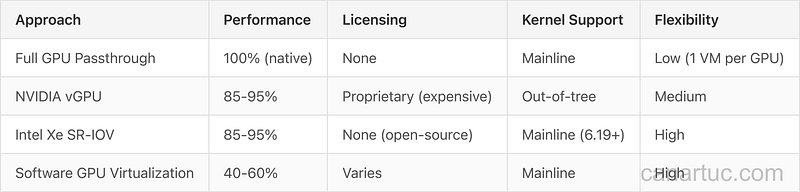
The fundamental issue? You had two options: dedicate an entire GPU to one VM (expensive and wasteful), or pay for NVIDIA’s proprietary vGPU licensing (even more expensive).
SR-IOV changes this equation entirely.
Single Root I/O Virtualization (SR-IOV) lets one physical GPU present itself as multiple virtual functions. Each VM gets its own slice of GPU resources. No hypervisor overhead. Near-native performance.
Intel’s Xe VFIO driver, now merged into Linux 6.19, brings this capability to Intel’s discrete GPU architecture with full mainline kernel support.
I am a human writer who gets motivated to write more with your support! You don’t need to pay. I just need your clap 👏 if you like my story and comment ✍️ if you want to say something. You can follow me on Medium, LinkedIn, and Bsky.
What This Actually Enables
Let me be specific about the use cases.
Cloud gaming infrastructure: Instead of dedicating one expensive GPU per gaming VM, you can now partition a single Intel GPU across multiple concurrent game streams. The economics shift from “one GPU = one user” to “one GPU = multiple users.”
VDI (Virtual Desktop Infrastructure): Graphics-accelerated virtual desktops become dramatically more cost-effective. Enterprise environments running CAD, design software, or any GPU-accelerated applications can consolidate workloads.
AI/ML in virtualized environments: Development environments, model inference, and training workloads can share GPU resources across containers and VMs without the overhead of proprietary licensing.
If this resonates with your infrastructure planning, clap so other architects dealing with GPU virtualization can find it.
The Technical Architecture

The architecture is elegant in its simplicity.
The Intel Xe GPU exposes a Physical Function (PF) managed by the host. This PF creates multiple Virtual Functions (VFs), each appearing as a complete PCIe device to guest VMs.
VFIO (Virtual Function I/O) provides the framework for passing these virtual functions directly to VMs. No emulation. No paravirtualization overhead. The guest VM’s GPU driver talks directly to the hardware through its assigned VF.
Recent fixes in the kernel patch series address VFIO link errors when the Xe module is built-in rather than loaded as a module. This kind of integration detail matters for production deployments where you want everything baked into the kernel.
Supported GPUs
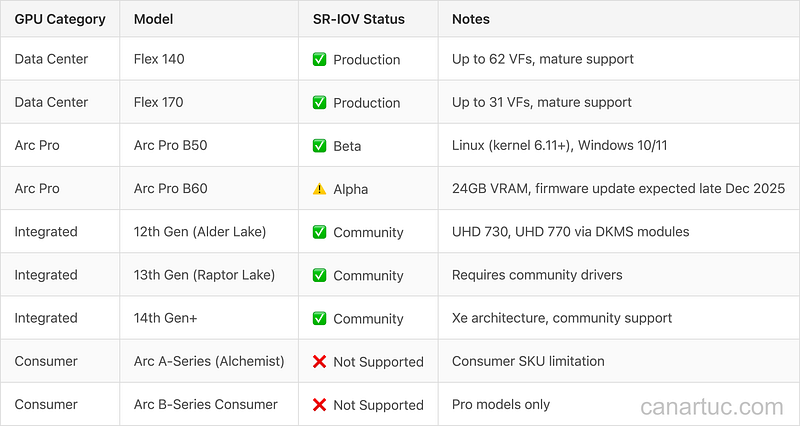
Before planning your SR-IOV deployment, understand which Intel GPUs actually support this feature. Intel restricts SR-IOV to professional and data center products.
Data Center Flex Series
The Intel Data Center GPU Flex 140 and Flex 170 offer the most mature SR-IOV implementation. The Flex 140 supports up to 62 virtual functions, while the Flex 170 supports up to 31 virtual functions, both with no licensing fees, making them the recommended choice for production VDI and cloud gaming deployments.
Note: Intel deprecated the Data Center GPU Flex Series in Intel XPU Manager 1.3.3 (late 2025), though existing deployments remain supported. The transition focus is shifting to Arc Pro B-Series for future data center use.
Arc Pro Series
The Arc Pro B50 provides SR-IOV support on Linux (kernel 6.11+) and Windows 10/11 in beta state. The Arc Pro B60 (24GB VRAM, 456 GB/s bandwidth) enters alpha SR-IOV support with a firmware update expected by late December 2025.
These professional SKUs target workstation virtualization, parallel multi-GPU operations, and containerized workloads.
Integrated Graphics (iGPU)
Intel’s 12th Gen (Alder Lake), 13th Gen (Raptor Lake), and 14th Gen integrated GPUs support SR-IOV through community DKMS modules. Models like UHD 730 and UHD 770 can partition into up to 7 virtual functions for lightweight VDI deployments.
Important: Integrated GPU SR-IOV requires community-maintained drivers, not official Intel support. For production environments, use Data Center Flex or Arc Pro cards.
What About Consumer Arc Cards?
Consumer Arc A-Series (Alchemist) and B-Series cards do not support SR-IOV. Intel restricts this feature to professional SKUs (Arc Pro) and data center products. This is a business decision, not a technical limitation.
If you need SR-IOV on a budget, consider 12th/13th Gen integrated graphics with community drivers for testing, or invest in Arc Pro cards for production.
Intel vs NVIDIA: The Open Source Difference
Have you tried getting NVIDIA vGPU working on a non-certified hypervisor?
I have. Multiple times. The experience involves proprietary drivers, licensing servers, certified hardware lists, and support tickets that go nowhere.
Intel’s approach is fundamentally different.
The Xe VFIO driver is now part of the mainline Linux kernel. No proprietary modules. No license servers. No artificial restrictions on which hypervisors or hardware configurations you can use.
This matters more than the technical specifications. When infrastructure code lives in the mainline kernel:
Kernel updates work. No more praying that your proprietary driver survives the next kernel release.
Community support exists. Issues get fixed upstream, not in vendor silos.
No license audits. Your legal team can sleep better.
Reproducible builds. Everything is source code, not binary blobs.
I’ve learned that operational simplicity often beats raw performance. A solution that works reliably at 80% performance beats a solution that works at 100% performance when the stars align.
Production Considerations
Before you rush to deploy this, some reality checks.
Hardware availability: Intel’s SR-IOV support is limited to Data Center Flex Series GPUs (Flex 140, Flex 170) with working support. Arc Pro B-Series cards (B50, B60) do not currently have SR-IOV enabled, though support is planned for future updates. Consumer Arc cards (A-Series, B-Series consumer) do not support SR-IOV. This limited hardware availability makes enterprise deployments dependent on specific Data Center GPU procurement.
Performance overhead: SR-IOV is more efficient than software-based virtualization, but it’s not zero overhead. Expect 1–8% performance impact compared to bare metal in optimized configurations, depending on workload and implementation.
Guest driver maturity: The Xe driver stack is newer than NVIDIA’s. Some edge cases and performance optimizations are still being refined.
Resource partitioning: How you divide GPU resources across VFs matters. Memory allocation, compute units, and bandwidth need careful planning for mixed workloads.
Timeline and Adoption
Linux 6.19 is the target kernel version for this feature. Given typical kernel release cycles, expect:
Early February 2026: Linux 6.19 release with Xe VFIO support (Feb 1st or Feb 8th expected)
Mid 2026: Enterprise distributions (RHEL, Ubuntu LTS) pick up the kernel
Late 2026: Production deployments in early adopter organizations
For those running bleeding-edge infrastructure, testing on kernel release candidates starts now.
The Bigger Picture
Intel’s commitment to mainline kernel inclusion signals something larger.
The GPU virtualization market has been dominated by proprietary solutions for too long. NVIDIA’s approach worked when they had no competition, but it created vendor lock-in that enterprise architects resent.
Open-source GPU virtualization changes the power dynamic.
Cloud providers can build GPU virtualization without paying per-VM licensing fees. Smaller hosting companies can compete on GPU workloads. Organizations can run their own infrastructure without vendor dependencies.
This is how commoditization works. The technology becomes standard. The margins compress. Innovation moves up the stack.
What This Means for You
If you’re running virtualized infrastructure:
Start planning now. Evaluate Intel Xe hardware for upcoming GPU purchases.
Test in staging. Get familiar with SR-IOV configuration on current Intel integrated graphics.
Watch the kernel development. Follow the intel-gfx mailing list for upstream discussions.
Calculate the economics. Model your workload density with GPU partitioning.
If you’re evaluating cloud providers:
Ask about Intel GPU options. Major providers will adopt this.
Compare TCO. Factor in licensing costs (or lack thereof) for GPU virtualization.
Consider hybrid approaches. Not every workload needs a full GPU.
The shift from proprietary to open-source GPU virtualization will take years, but it starts with kernel patches like this one.
Closing Thoughts
Twenty years of building infrastructure taught me to watch kernel commits, not press releases.
Intel Xe VFIO support in Linux 6.19 is a kernel commit that matters. It’s not revolutionary technology (SR-IOV has existed for years), but mainline support for Intel’s discrete GPU architecture opens doors that were previously locked behind proprietary licensing.
The best infrastructure decisions are the ones you don’t have to re-make. Open-source GPU virtualization in the mainline kernel is that kind of decision.
The proprietary vendors will adapt. They always do. But for now, the advantage belongs to those who build on open foundations.
Are you planning to evaluate Intel Xe for virtualized GPU workloads? What’s holding back GPU virtualization adoption in your infrastructure? Share your experience in the comments.
I am a human writer who gets motivated to write more with your support! You don’t need to pay. I just need your clap 👏 if you like my story and comment ✍️ if you want to say something. You can follow me on Medium, LinkedIn, and Bsky.